
1.リンクアグリゲーション(EtherChannel)とは?
- 複数の物理リンクを1本の論理リンクとして束ねる技術
- Cisco用語では EtherChannel
リンクアグリゲーション(EtherChannel)とは、複数の物理ポートを束ねて1つの論理リンクとして扱う技術です。
スイッチ間の帯域拡張や冗長化を実現しつつ、STPによるブロッキングを回避できる点が特徴です。
2.リンクアグリゲーション(EtherChannel)の目的
① 帯域幅の向上
- 1Gbps × 4本 → 最大4Gbps相当
- ※ 1通信=1リンク(ロードバランス)
② 冗長性の確保
- 1本切断されても通信継続
- STP的には 1リンク扱い
③ STPの制限回避
- 複数リンクを束ねることで
ブロックされずに全リンク活用
3.リンクアグリゲーション(EtherChannel)のプロトコル
| プロトコル | 特徴 | 試験ポイント |
|---|---|---|
| PAgP | Cisco独自 | auto / desirable |
| LACP | IEEE 802.3ad | active / passive |
| 強制(on) | プロトコル不使用 | 不一致時に危険 |
モード比較
| プロトコル | モード | 動作 |
|---|---|---|
| PAgP | desirable | 積極的に交渉 |
| PAgP | auto | 受動的 |
| LACP | active | 積極的に交渉 |
| LACP | passive | 受動的 |
| on | – | 強制的に束ねる |
👉 試験では「LACP active × passive = 成立」などの組み合わせが頻出
4.Ciscoデバイスでの設定コマンド
4.0 設定の一連の流れ
L2 / L3 EtherChannel 設定フロー比較表
🔷 全体像
L3 EtherChannel
→ VLANを使わず、IPは Port-channel に設定
L2 EtherChannel
→ VLANを使い、IPは SVI に設定
👉 考え方は同じ、設定場所が違う
| 項目 | L2 EtherChannel | L3 EtherChannel |
|---|---|---|
| IPアドレス | 設定しない | Port-channelに設定 |
| 用途 | VLAN / Trunk | ルーティング |
| interface | access / trunk | no switchport |
L2 / L3 EtherChannel 設定の違い(一覧表)
| 項目 | L2 EtherChannel | L3 EtherChannel |
|---|---|---|
| 論理IF | Port-channel | Port-channel |
| 論理IFの役割 | L2(VLANに属する) | L3(ルーティング) |
| switchport | 使用 | 不使用 |
| no switchport | 不使用 | 使用 |
| VLAN | 使用 | 不使用 |
| IP設定場所 | SVI(interface vlan) | Port-channel |
| STP | 関与 | 非関与 |
| 主な用途 | 端末収容・VLAN拡張 | 機器間接続 |
| 構成の複雑さ | やや複雑 | シンプル |
🔶 L2 EtherChannel 設定フロー表
| 手順 | 設定対象 | 概要 | コマンド例 |
|---|---|---|---|
| ① | 論理IF | Port-channel作成 | interface port-channel 1 |
| ② | 論理IF | L2として使用 | switchport mode trunk |
| ③ | 物理IF | 対象ポート指定 | interface range g0/1-2 |
| ④ | 物理IF | L2モード指定 | switchport mode trunk |
| ⑤ | 物理IF | EtherChannel参加 | channel-group 1 mode active |
| ⑥ | VLAN | VLAN作成 | vlan 10 |
| ⑦ | SVI | VLANにIP設定 | interface vlan 10ip address 192.168.10.1 255.255.255.0 |
| ⑧ | 各IF | 有効化 | no shutdown |
🔶 L3 EtherChannel 設定フロー表
| 手順 | 設定対象 | 概要 | コマンド例 |
|---|---|---|---|
| ① | 論理IF | Port-channel作成 | interface port-channel 1 |
| ② | 論理IF | L3化 | no switchport |
| ③ | 論理IF | IPアドレス設定 | ip address 192.168.1.1 255.255.255.0 |
| ④ | 物理IF | 対象ポート指定 | interface range g0/1-2 |
| ⑤ | 物理IF | L3化 | no switchport |
| ⑥ | 物理IF | EtherChannel参加 | channel-group 1 mode active |
| ⑦ | 各IF | 有効化 | no shutdown |
4.1 論理インターフェースの作成
Switch(config)# interface Port-channel1
4.2 レイヤ3モードへ移行
(config-if)# no switchport
4.3 IPアドレスの設定
(config-if)# ip address <IPアドレス> <サブネットマスク>
4.4 ポートの指定
(config)# interface range g0/1 - 2注意点(試験・実務共通)
- 速度・デュプレックスが一致
- VLAN設定が一致
- trunk/access が一致
👉 一致していないと束ねられない
4.5 リンクアグリゲーションの設定
L2 EtherChannel(LACP例)
(config-if-range)# channel-group 1 mode active ←チャンネルグループのモードの指定
(config-if-range)# exit
(config)# interface port-channel 1
(config-if)# switchport mode trunk ←L2デバイスはチャンネルをトランクに設定
L3 EtherChannel(LACP例)
(config-if-range)# no switchport
(config-if-range)# channel-group 1 mode active ←チャンネルグループのモードの指定
(config-if-range)# exit
(config)# interface port-channel 1
(config-if)# ip address 192.168.1.1 255.255.255.0 ←ポートチャンネルにIPアドレスの設定
4.4 リンクアグリゲーションの確認
| コマンド | 概要 | 内容 |
|---|---|---|
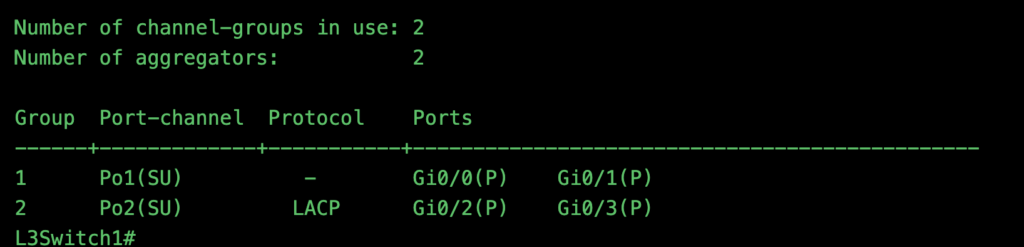
| show etherchannel summary | EtherChannel の 全体概要を一目で確認できる最重要コマンド | ・チャンネルグループ番号 ・ポートチャネルの状態 ・使用しているプロトコル ・チャンネルグループに所属している物理インターフェース |
| show interfaces port-channel 1 | 指定した Port-channel インターフェースの 詳細情報を確認するコマンド | ・リンク状態(up/down) ・帯域幅(束ねた合計値) ・エラーカウンタ ・トラフィック状況 |
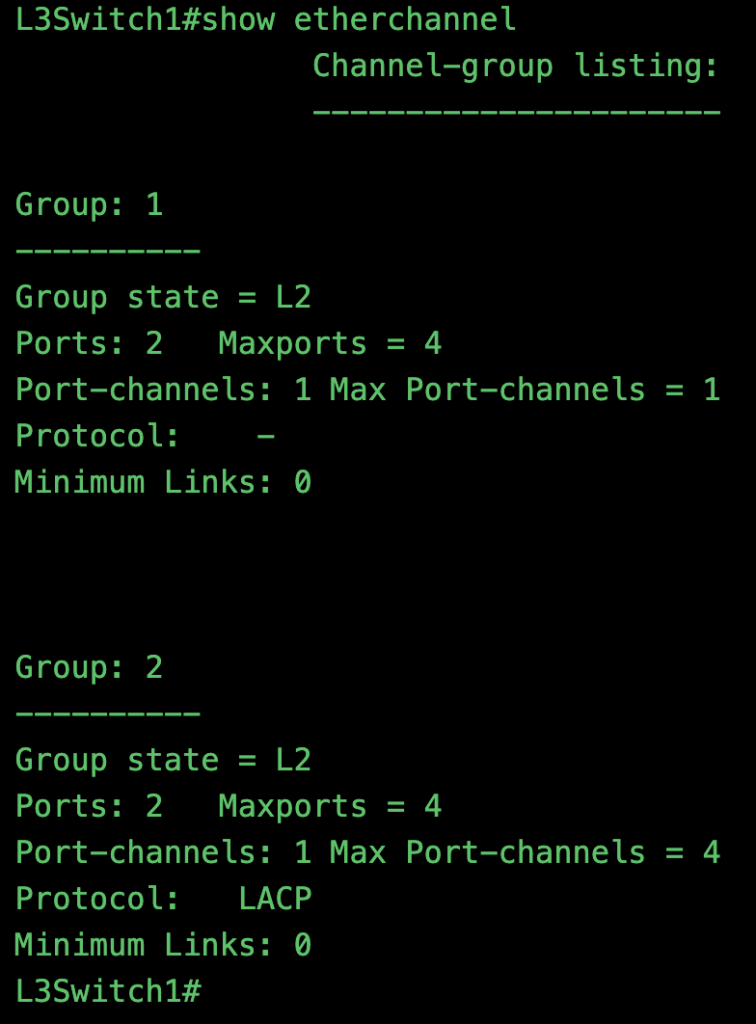
| show etherchannel | チャンネルグループごとの 詳細な情報を一覧表示コマンド | ・チャンネルグループの状態(L2 / L3) ・所属ポート数 ・ポートチャネル数 ・使用プロトコル ・最大リンク数 |
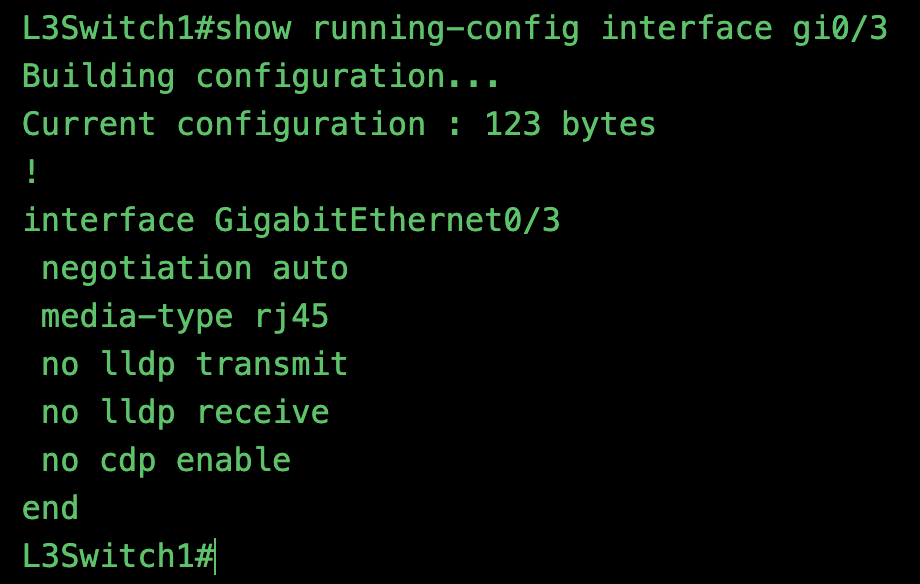
| # show runnning-config interface gigabitEthernet0/3 | 指定インターフェースの 現在の設定内容を確認。コマンド | ・EtherChannel 関連設定 ・CDP / LLDP の有効・無効状態 ・switchport / no switchport ・channel-group 設定 |
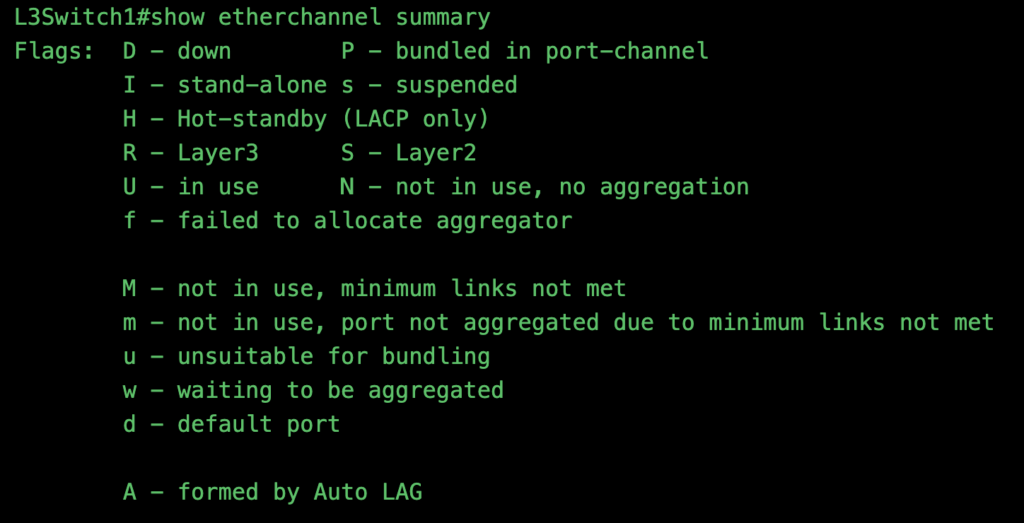
# show etherchannel summary
確認できる主な項目
- チャンネルグループ番号
- ポートチャネルの状態
- 使用しているプロトコル
- チャンネルグループに所属している物理インターフェース
表示内容の読み取りポイント
| 項目 | 内容 |
|---|---|
| Group | チャンネルグループ番号 |
| Port-channel | 論理インターフェース |
| Protocol | LACP / PAgP / on |
| Ports | 参加している物理ポート |
状態表示(重要)
S:Layer2R:Layer3U:使用中(Up)
例:
SU→ Layer2で正常稼働RU→ Layer3で正常稼働
👉 CCNA / NW試験頻出ポイント
# show interfaces port-channel 1
主な用途
- リンク状態(up/down)
- 帯域幅(束ねた合計値)
- エラーカウンタ
- トラフィック状況
👉show etherchannel summary が「全体確認」show interfaces port-channel が「詳細確認」
という使い分け。
# show etherchannel
# show runnning-config interface gigabitEthernet0/3
インターフェースのCDP・LLDPの状態を確認するコマンド
指定インターフェースの 現在の設定内容を確認。
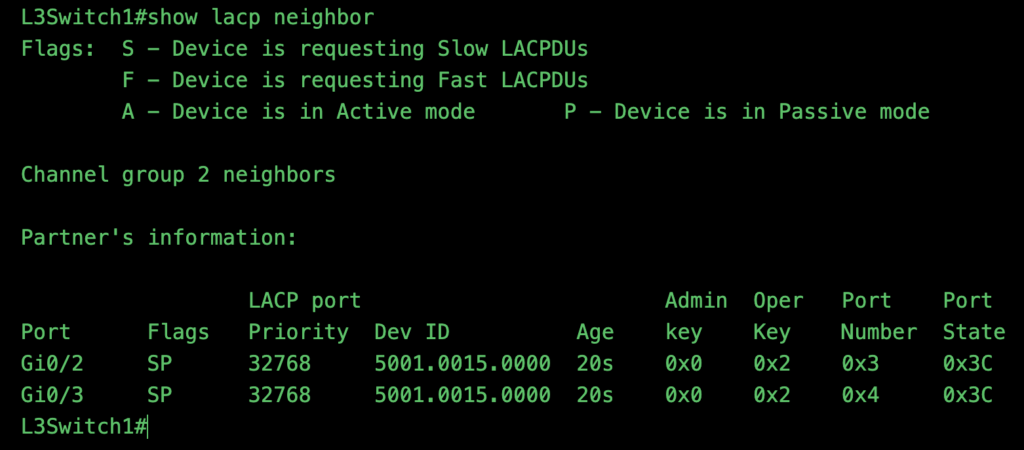
# show lacp neighbors
隣接のLACPの機器情報の確認コマンド
・Port;自身のインターフェースのポート
・Flags;ポートの状態
・Priority;LACPのプライオリティ(デフォルト32768)
・Dev ID;デバイスのID
・Age;エージングタイム(応答がなければ破棄する時間)
・Admin key;
・Oper;
・Port Number;
・Port State;
表示例の読み方
SU→ Layer2 / in useRU→ Layer3 / in use
5.試験でのポイント(CCNA / NW)
よく出るポイント
- PAgP と LACP の違い
- active / passive / desirable / auto
- L2とL3の設定差
- STPとの関係(1リンク扱い)
引っかけ例
- mode on の危険性
- 片側だけ設定しているケース
- VLAN不一致
6.確認テスト
<L2>
・Switchportあり
・Trunk設定必要
・IPアドレス設定不可
<L3>
・no switchport
・VLAN設定不要
・IPアドレスはport-channelに設定
7.まとめ
- EtherChannelは帯域拡張+冗長化
- L2 / L3の違いを意識


コメント